What is the new “Cancel Wipe” Feature in 26.02 UEM ?
Wipe commands are among the most powerful actions available to Workspace ONE UEM administrators—and until now (except of some SQL invention and Omnissa Support involvement) , also among the most unforgiving. With the 26.02 UEM release, Omnissa introduces a small but impactful additional safeguard: the ability to cancel queued Device Wipe and Enterprise Wipe commands before they reach the device. This new Cancel Wipe capability adds a critical layer of protection against accidental wipes and unintended data loss, without changing the fundamental security model of UEM.
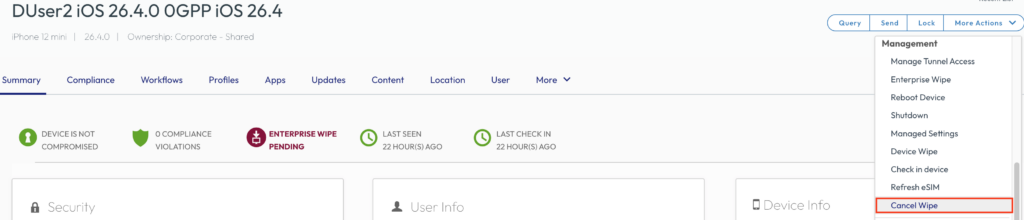
Let us have a look in the UEM Console, here I wiped the Device , as the Device is not online it did not consume the Wipe. So I have the “Cancel Wipe” Button. Once clicked it removes the Command from the Queue for the wipe.
In Troubleshooting Log we can see the Details where the Wipe was initiated as well when it got Cancelled

There is a Commands API (Version 3) that can be used as well to cancel the Wipes :
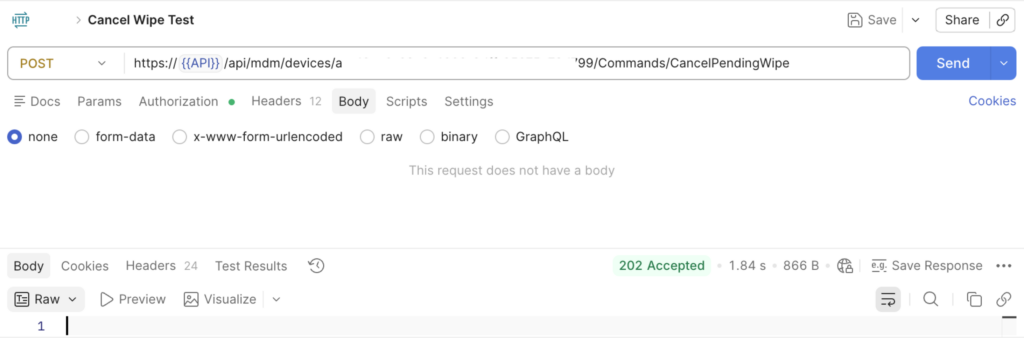
I also created a Postman Collection , that can be imported and used. It is hosted on my Github here:
https://github.com/EUCPatrick/UEM-API-/blob/main/Cancel%20Wipe.json
Note: It is using the device UUID , not the Device ID in the POST Command, so make sure you enter the correct value.
While I hope it is not needed often , we can be happy to have the Safeguard of Cancel Wipe there and accessible from the Helpdesk / Admin directly without any need to ask Omnissa for help.

vExpert, blogger and VMware & Omnissa champion. Worked 10 years as a Architect for a partner before joining VMware in 2017. Moved to Omnissa in 2024.